
When Kubernetes first hit the scene for container orchestration, devops engineers all asked “Whoa this is cool! Can I run my database in here?” We quickly learned the answer, “Hell no!”
In the world of Kubernetes, where nodes and pods spin up and down and are moved from node to node, having a primary with replicas running in a StatefulSet was just too risky. I’m happy to say now with PostgreSQL Operators like CloudNativePG and CRDs, not only is running Postgres in Kubernetes safe, it’s preferred.
Here I will show an example of a highly available PostgreSQL cluster running in Kubernetes using the CloudNativePG Operator. I will spin up a test cluster in AWS using GitOps Playground, which is a quick and easy way to spin up and tear down real world Kubernetes clusters in the cloud and test services.

Install
There are a number of ways to install CloudNativePG like kubectl apply -f https://raw.githubusercontent.com/cloudnative-pg/cloudnative-pg/release-1.21/releases/cnpg-1.21.0.yaml or using Helm.
In this demo I will spin up an EKS cluster in AWS and install CloudNativePG using the following ArgoCD Application manifest:
apiVersion: argoproj.io/v1alpha1
kind: Application
metadata:
  name: cnpg-operator
  namespace: argocd
spec:
  project: default
  syncPolicy:
    syncOptions:
      - CreateNamespace=true
    automated:
      prune: true
      allowEmpty: true

  source:
    chart: cloudnative-pg
    repoURL: https://cloudnative-pg.github.io/charts
    targetRevision: 0.18.2
    helm:
      releaseName: cloudnative-pg
      valuesObject:
        replicaCount: 2

  destination:
    server: "https://kubernetes.default.svc"
    namespace: cnpg-system
This will install the operator and the following CRDs:
– backups.postgresql.cnpg.io
– clusters.postgresql.cnpg.io
– poolers.postgresql.cnpg.io
– scheduledbackups.postgresql.cnpg.io
And create the operator:
$ kubectl get pods --namespace cnpg-system
NAME                              READY   STATUS    RESTARTS   AGE
cloudnative-pg-74c95d6bb9-7glp4   1/1     Running   0          13m
The operator will handle creating clusters, assigning primary and read replicas, running backups, etc. We can create a test cluster with 1 primary and 2 replicas with persistent storage via the EBS CSI driver and the clusters.postgresql.cnpg.io CRD. Here is an example of a Cluster manifest:
apiVersion: postgresql.cnpg.io/v1
kind: Cluster
metadata:
  name: test-db
spec:
  description: "Test CNPG Database"
  instances: 3

  replicationSlots:
    highAvailability:
      enabled: true
    updateInterval: 300
  primaryUpdateStrategy: unsupervised

  postgresql:
    parameters:
      shared_buffers: 256MB
      pg_stat_statements.max: '10000'
      pg_stat_statements.track: all
      auto_explain.log_min_duration: '10s'

  logLevel: debug
  storage:
    size: 10Gi

  monitoring:
    enablePodMonitor: true

  resources:
    requests:
      memory: "512Mi"
      cpu: "1"
    limits:
      memory: "1Gi"
      cpu: "2"
This will create the pods with PVC claims and rw/ro services.
$ kubectl get pods -l role=primary
NAME        READY   STATUS    RESTARTS   AGE
test-db-1   1/1     Running   0          28m
$ kubectl get pods -l role=replica
NAME        READY   STATUS    RESTARTS   AGE
test-db-2   1/1     Running   0          27m
test-db-3   1/1     Running   0          27m
$ kubectl get pvc
NAME        STATUS   VOLUME         CAPACITY   ACCESS MODES   STORAGECLASS   AGE
test-db-1   Bound    pvc-d1e6b4cb   10Gi       RWO            gp2            30m
test-db-2   Bound    pvc-811c16b1   10Gi       RWO            gp2            29m
test-db-3   Bound    pvc-1bc6f7ca   10Gi       RWO            gp2            29m
$ kubectl get svc
NAME         TYPE        CLUSTER-IP       EXTERNAL-IP   PORT(S)    AGE
kubernetes   ClusterIP   172.20.0.1               443/TCP    57m
test-db-r    ClusterIP   172.20.142.251           5432/TCP   29m
test-db-ro   ClusterIP   172.20.223.20            5432/TCP   29m
test-db-rw   ClusterIP   172.20.24.157            5432/TCP   29m
To access the cluster first grab the password from secrets, then expose the port:
$ kubectl get secret test-db-app -o jsonpath='{.data.password}' | base64 --decode
1EEqc4pGb64thxqz7rgVq05dpqpCjEoSObq1WnvrQDkZfTDaHTDdp0whVKOG2NJZ
$ kubectl port-forward service/test-db-rw 5432:postgres &
Forwarding from 127.0.0.1:5432 -> 5432
Forwarding from [::1]:5432 -> 5432
$ psql -h localhost -U app
Password for user app:

Type "help" for help.

app=> CREATE TABLE test (user_id serial PRIMARY KEY, username VARCHAR(50));
CREATE TABLE
app=>
Testing Failover
By default CNPG will create a user named streaming_replica that will setup asynchronous streaming replication using TLS for encryption. If the primary pod is ever evicted, delete, or readiness/liveness fail the operator will promote a replica to primary, and create a new replica pod. The failover process should be short since the rw service will point to the promoted pod instantly. Lets see this process in action:
In this test I have 1 primary and 2 replicas. On the left side I am running a script that inserts the date into a table every 0.5 seconds. on the right side I will drain the node the primary is running on. Notice the failover time.
The operator detects that the primary was evicted, promotes test-db-2 as the new primary, and spins up test-db-1 on another node as a replica in about 10 seconds. Not bad! You can also enable quorum-based synchronous streaming replication by selecting the minSyncReplicas and maxSyncReplicas.
Backups
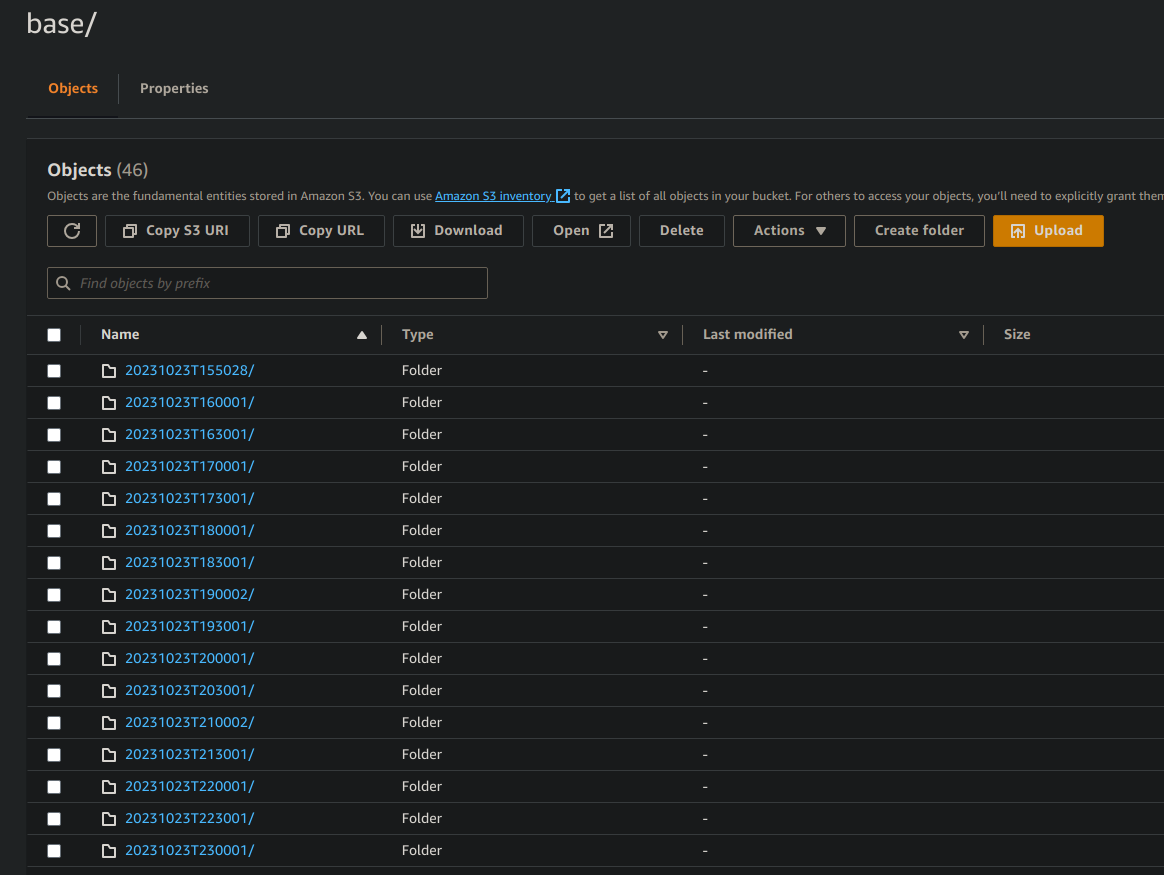
CloudNativePG uses the Barman tool to created backups in AWS S3, Microsoft Azure Blob Storage, or Google Cloud Storage. You can either create an on-demand backup using the Backup CRD, or a cron scheduled backup using the ScheduledBackup CRD. Lets see an example of both backup types in AWS S3.
First we will add AWS access id and key as a Kubernetes secret that has access to an S3 bucket:
kubectl create secret generic aws-creds \
  --from-literal=ACCESS_KEY_ID=your_id \
  --from-literal=ACCESS_SECRET_KEY=your_key
Then update the Cluster manifest with the AWS credentials:
...
spec:
  backup:
    barmanObjectStore:
      destinationPath: "s3://your_bucket_name/"
      s3Credentials:
        accessKeyId:
          name: aws-creds
          key: ACCESS_KEY_ID
        secretAccessKey:
          name: aws-creds
          key: ACCESS_SECRET_KEY

...
Now we are ready to intall the ScheduledBackup and Backup CRDs:
apiVersion: postgresql.cnpg.io/v1
kind: ScheduledBackup
metadata:
  name: scheduled-backup
spec:
  schedule: "0 */30 * * * *" # Every 30 minutes
  backupOwnerReference: self
  cluster:
    name: test-db
---
apiVersion: postgresql.cnpg.io/v1
kind: Backup
metadata:
  name: on-demand-backup
spec:
  cluster:
    name: test-db
When installed, a backup will be generated every 30 minutes, or we can run kubectl cnpg backup on-demand-backup to initiate a backup. Now we can see the backups in S3
Monitoring
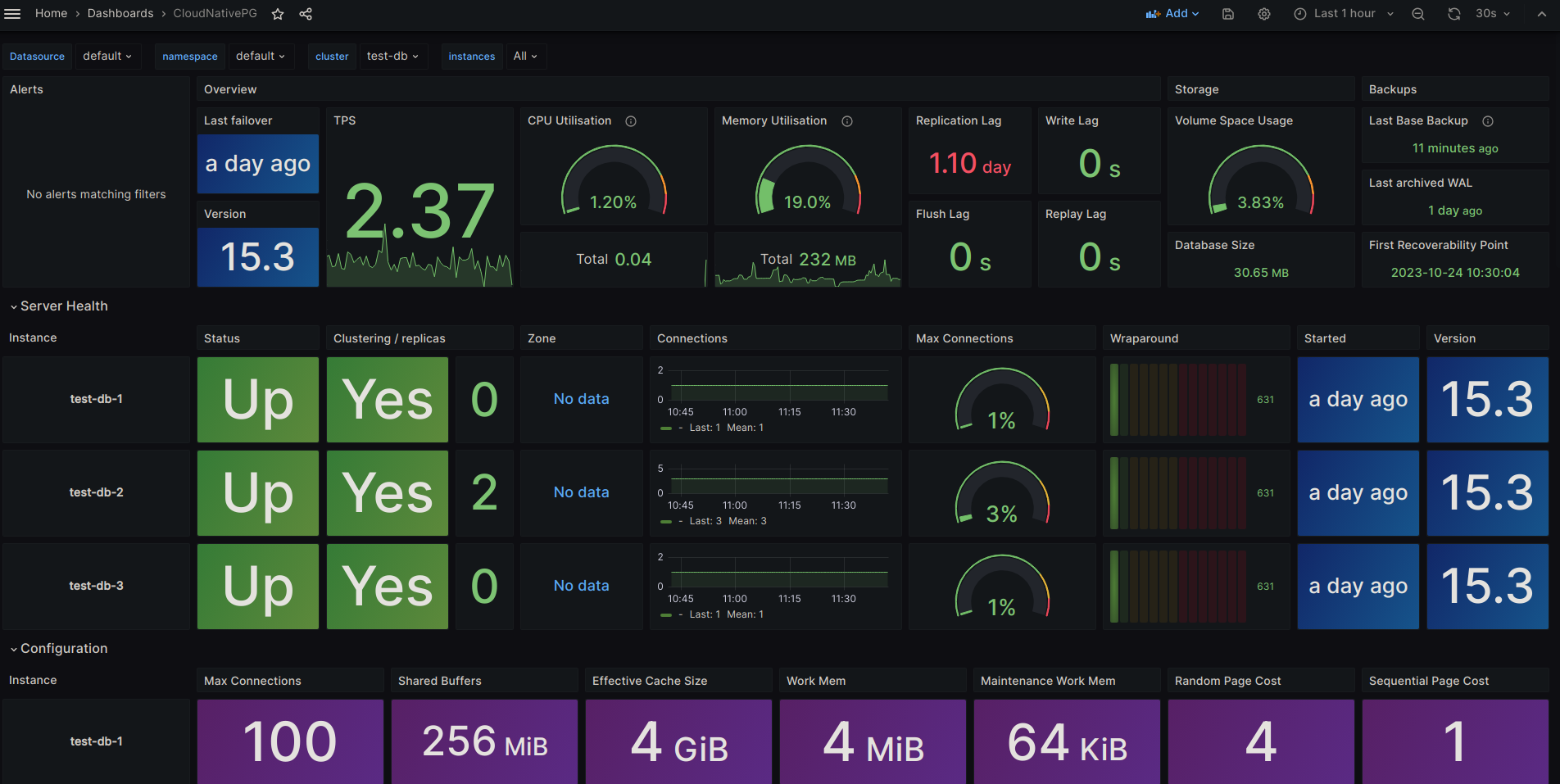
CloudNativePG will add a PodMonitor when monitoring.enablePodMonitor = true. This will enable Prometheus to scrape metrics, and using the Cloudnative-pg Grafana Dashboard we have a nice graph to view our clusters.
Connection Pooling
CloudNativePG uses PGBouncer for connection pooling with the Pooler CRD. The Pooler is associated with a Cluster in the same namespace, and will create pods and services. To connect to the cluster, you will connect to the PGBounder service, and those pods will have direct connection to the DB Cluster service.
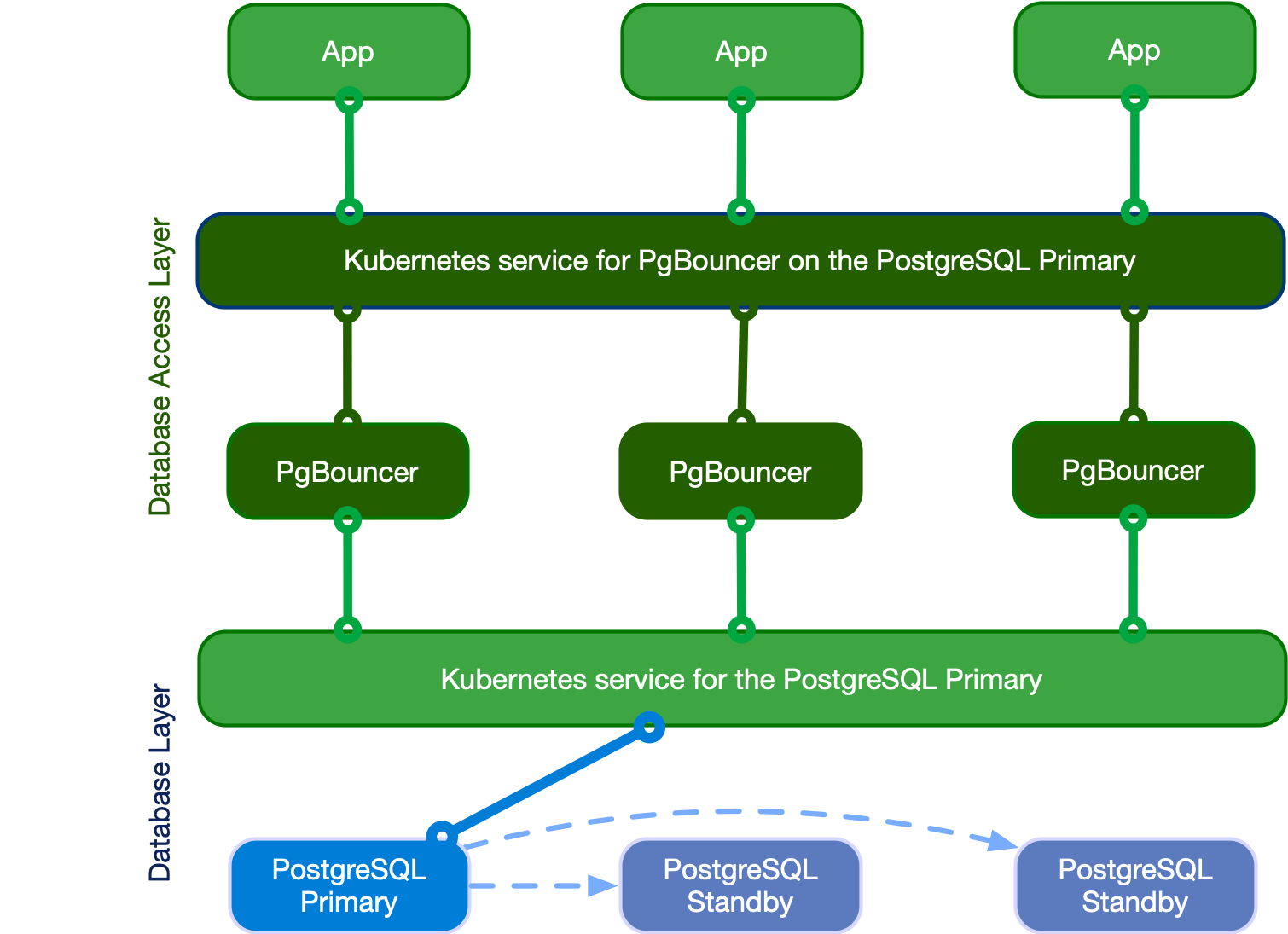
Here is an example of a Pooler manifest:
apiVersion: postgresql.cnpg.io/v1
kind: Pooler
metadata:
  name: pooler-demo
spec:
  cluster:
    name: test-db

  instances: 3
  type: rw
  pgbouncer:
    poolMode: session
    parameters:
      max_client_conn: "1000"
      default_pool_size: "10"
This will create 3 PGBouncer pods and a service
$ kubectl get pods -l cnpg.io/poolerName=pooler-demo
NAME                           READY   STATUS    RESTARTS   AGE
pooler-demo-5c5db8595c-5qpkb   1/1     Running   0          40m
pooler-demo-5c5db8595c-pq4f6   1/1     Running   0          40m
pooler-demo-5c5db8595c-xk9zd   1/1     Running   0          40m
$ kubectl get svc/pooler-demo
NAME          TYPE        CLUSTER-IP       EXTERNAL-IP   PORT(S)    AGE
pooler-demo   ClusterIP   172.20.232.201           5432/TCP   42m
Now you can expose the pool service and connect to the cluster via the pooler:
$ kubectl port-forward svc/pooler-demo 5432:pgbouncer
Forwarding from 127.0.0.1:5432 -> 5432
Forwarding from [::1]:5432 -> 5432
psql -h localhost -U app

Type "help" for help.

app=> \l

   Name    |  Owner   | Encoding |  Access privileges
-----------+----------+----------+---------+-------+----------------
 app       | app      | UTF8     |
 postgres  | postgres | UTF8     | =Tc/postgres                    +
           |          |          | postgres=CTc/postgres           +
           |          |          | cnpg_pooler_pgbouncer=c/postgres
 template0 | postgres | UTF8     | =c/postgres                     +
           |          |          | postgres=CTc/postgres
 template1 | postgres | UTF8     | =c/postgres                     +
           |          |          | postgres=CTc/postgres
(4 rows)
Conclusion
CloudNativePG has a lot of features that make running Postgres in Kubernetes the preferred way in cases where you cannot use cloud based managed databases, and I’m looking forward to using it in the future. Reminder if you used GitOps Playground to spin up a test cluster, don’t forget to run the teardown script.